Photo Albums
flickr.com - For $20 a year, I get unlimited space on their servers for pictures.
Pros: Tags and Albums make photo organization easy. Instant sharing with everyone else who wants to see my stuff.
Cons: I can't store video on flickr (yet), making mixed media events difficult to organize.
Bookmarks & Favorites
del.icio.us - Social bookmarking is so hot right now...
Pros: My bookmarks are on any machine with internet access. Tags on del.icio.us are shared by everyone (and I can use everyone's tags).
Cons: Unless you download addons for your browser, bookmarking a site takes a little work.
Email
Gmail.com - Google Email. I used to use Yahoo! Mail, but I was getting 50-100 spam emails in my Inbox a day (and reporting them as spam didn't help). That may be a side effect of having the same email address for 12 years, but it was out of control.
Pros: The feature that organizes replies and responses to emails is a godsend. Tagging, instead of folders, makes email sorting a completely different affair.
Cons: Tagging, instead of folders, makes email sorting a completely different affair.
RSS
Bloglines.com - I used to use Omea Reader (excellent aggregator!), but always ran into the problem where the feeds I looked at during work would still be marked "new" when I came home. For light RSS users, that's not a problem, but I currently track 136 sites with RSS. When each site makes between 1-50 posts a day, I get tired of manually keeping track of what I've already seen. That's where Bloglines comes in...
Pros: One spot for all my feeds. No manually updating multiple desktop programs. Built-in sections for blogs and clippings help with organizing research. Bloglines also shows you how many other people on Bloglines subscribe to that feed AND has a "related feeds" link so you can find other site feeds on the same subject. Very nice...
Cons: Online only. With Omea Reader, I had everything downloaded to my desktop so I could browse offline. This might not be as much of a problem if you have a mobile data service.
Office Documents
Google Documents - MS Word and Excel documents that you can upload, edit, and save online.
Pros: Edit your documents wherever you go.
Cons: The feature sets of Google Docs are very simple. They cannot replace a full Office Suite for every scenario.
Things I'm still working on:
Music & Entertainment
I don't see my 40GB music collection getting uploaded to a site anytime soon, but I just signed up for a free Locker over at mp3.com. If I pay $40 a year, I can upload every song I own. I'll be checking that out...
Showing posts with label Computers. Show all posts
Showing posts with label Computers. Show all posts
Saturday, November 24, 2007


Saturday, November 17, 2007
The Joy of Having a Second Computer...
One of the greatest things about having more than one computer in the house is not being stuck if one of them fails... But... What do you when both of your computers fail?
The power supply failed on my Ubuntu rig.
The chipset fan failed on my Windows rig.
You tear them apart and build one working computer! So I took the power supply out of my windows rig and got the Ubuntu rig running. Until the new parts arrive, I will have to use Linux...
Lindsay doesn't speak Esperanto (and my feeble attempts to learn it failed) so I wiped the Ubuntu off and installed Fedora 8... in english. HUGE difference! Not only do I understand the words on the screen, but all my hardware was configured without any coercion from me.
Why do I comment on this? Because this is the first time I've found a turnkey Linux distro for a custom-built computer without consulting a linux compatibility hardware list. Maybe I just got lucky, but I consider this to be a good sign. Linux may be reaching a tipping point for mass adoption. Walmart seems to think so...
The power supply failed on my Ubuntu rig.
The chipset fan failed on my Windows rig.
You tear them apart and build one working computer! So I took the power supply out of my windows rig and got the Ubuntu rig running. Until the new parts arrive, I will have to use Linux...
Lindsay doesn't speak Esperanto (and my feeble attempts to learn it failed) so I wiped the Ubuntu off and installed Fedora 8... in english. HUGE difference! Not only do I understand the words on the screen, but all my hardware was configured without any coercion from me.
Why do I comment on this? Because this is the first time I've found a turnkey Linux distro for a custom-built computer without consulting a linux compatibility hardware list. Maybe I just got lucky, but I consider this to be a good sign. Linux may be reaching a tipping point for mass adoption. Walmart seems to think so...

Sunday, March 18, 2007
Children know too much about computers...
I got some new hard drives for my main machine today. The old hard drive was giving bad sector errors, despite being under a year old. So, I got two new hard drives for the system.
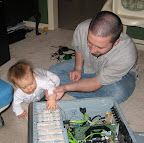
Taylor Ann is learning a lot in this picture. I showed her where to plug in the connectors to the main power switch. She had an easier time getting it on than I did. Small hands work wonders inside a cramped case. We also took the time to discuss the finer points of SATA raid configurations. See, I wanted to do Raid 0 but Taylor pointed out the multiple copies of personal data that I have on my secondary systems and that my gaming rig would benefit from Raid 1 where performance is more important than redundancy. In the end we decided to compromise, and we did Raid 1 across both drives...
Taylor Ann is learning a lot in this picture. I showed her where to plug in the connectors to the main power switch. She had an easier time getting it on than I did. Small hands work wonders inside a cramped case. We also took the time to discuss the finer points of SATA raid configurations. See, I wanted to do Raid 0 but Taylor pointed out the multiple copies of personal data that I have on my secondary systems and that my gaming rig would benefit from Raid 1 where performance is more important than redundancy. In the end we decided to compromise, and we did Raid 1 across both drives...
Subscribe to:
Posts (Atom)
Stay up to date!
